1. a self-repeating image whose copies spiral as
they shrink, in the manner of M. C. Escher's
Print Gallery.
•a tententoon of the old
gallery, winding inward without end.
Origin
coined from the Dutch Prentententoonstelling
(“print exhibition”): prenten, prints +
tentoonstelling, exhibition. The coined word sits right where
the two halves meet.
What if outside and inside had no border?
A picture nested inside itself is called the Droste effect,
after the 1904 Dutch cocoa tin whose nurse carries a tray with the very same
tin (panel 2). You can fall inward forever — yet every copy stays
fenced inside its own frame, separating the room outside from the miniature
room within.
What if that boundary dissolved? Give each nested copy a
gentle turn as it shrinks so the painted wreath around the portal connects
from one level to the next, and outside and inside fuse into a single
unbroken spiral — a tententoon (panel 3).
1 The picture marked portal
source ornate rim
2 Inside itself Droste effect
concentric rings
3 With a twist tententoon
single spiral
Watch the math, then touch it
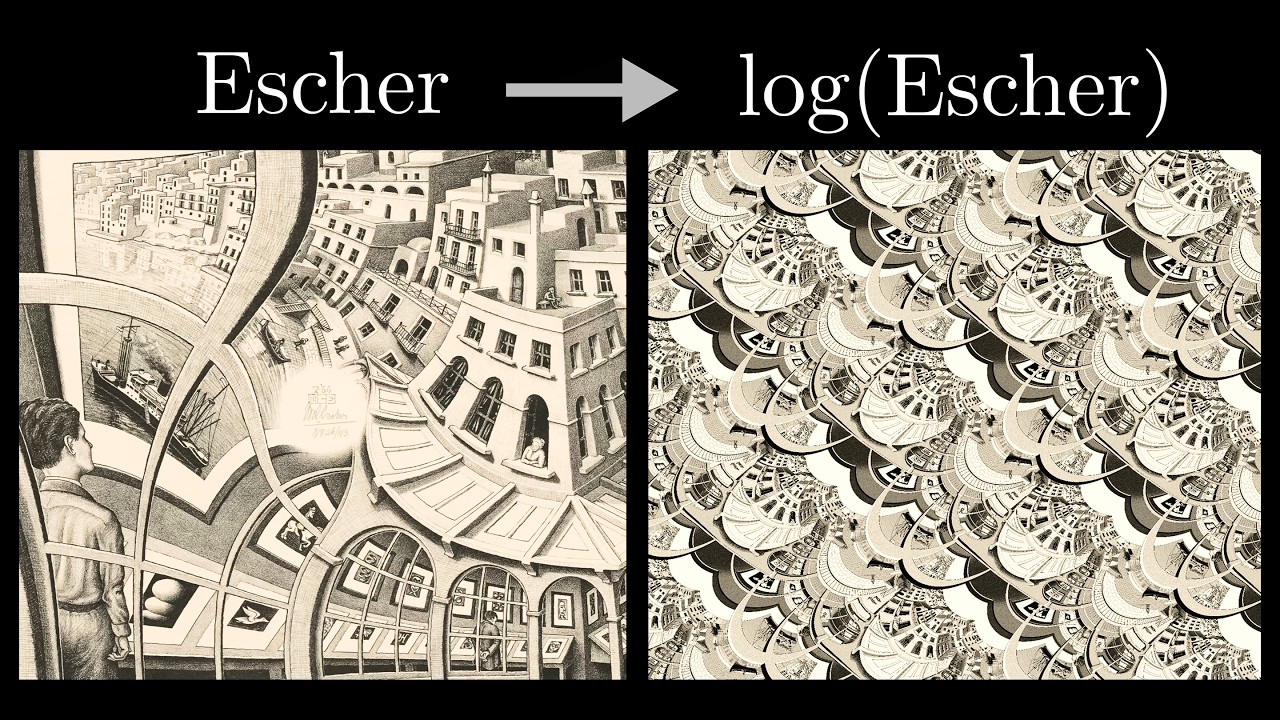
M. C. Escher drew the first spiral of this kind by hand in 1956 for
his lithograph Print Gallery, leaving a small white patch in the
center where the lines grew too tight for his pen. In 2003, mathematicians
Bart de Smit and Hendrik Lenstra found
the exact complex function behind Escher's curved grid and used it to complete
the missing center.
Why does complex arithmetic warp a photograph so dramatically without smearing
its details, and how does unrolling a circle into a flat strip make the spiral
easy to build? Grant Sanderson (3Blue1Brown) tells the
whole story far better than static text can. Watch his video for the
explanation, then use the two widgets below to feel every step with your own
hands.
3Blue1Brown on Escher's Print Gallery and the de Smit–Lenstra transformation.
1 · How complex functions warp a picture
Treat the picture as the complex plane: every pixel is a single number
z = x + iy, and a function f(z)
moves every pixel at once. Click any function in the middle column to watch
the plane morph from z to f(z), or drag the orange
point on the left plane.
input plane drag me
inputz =
function
Identity — every point stays right where it started.
show
identity → function
zf(z)
output plane
outputf(z) =
Scale & spin
Click f(z) = 2z to double every distance
from the center, then f(z) = iz to rotate
the plane by 90°. Multiplying by a complex number scales and rotates in
one move.
Watch the little square
Turn on photo, pick f(z) = z2,
and drag the point around. Even while the whole workshop bends, the small
orange square around your point stays a square — locally it only scales
and turns, which is why the sun face, clockwork gears, and basil leaves stay
crisp instead of sheared.
Roll & unroll
Click exp(z): upright vertical lines wrap around the
origin into concentric circles. Then click log(z):
it cuts those circles open and unrolls them back into a flat vertical strip.
2 · Unroll, tilt, and roll back up
Now chain those three moves together on the workshop picture. Because the
logarithm stretches the region right around the portal, the ornate
celestial & botanical wreath ends up filling most of the canvas:
log unrolls the round wreath into tall vertical friezes of suns,
moons, gears, and vines (panel 1), a complex multiply tilts
those friezes so the top of one lines up with the bottom of the next
(panel 2), and exp rolls the tilted friezes back into a
single continuous spiral (panel 3).
View
in Droste picture
shrink S = 3.84×
nested source
Concentric wreath rings (twist = 0°)
1 we log it
ζ = log(z − c) · ln S = 1.34
flat strip drag me↔ zoom ↕ turn
Wreath unrolls into vertical friezes
2 we bend it
ζ → αζ, α = 1 − 0.21i
tilted strip
3 we exponentiate it
w = c + (z − c)α
rolled up
Drag panel 1 (flat strip): ↔ zooms the round views, ↕ rotates them
In short: flatten the nested rings with a logarithm into a repeating strip,
tilt the strip to the exact angle where neighboring copies line up, and roll it
back up with an exponential.
1 · Drag the unrolled wreath
In panel 1, log(z − c) cuts each circular
wreath open into a vertical frieze: golden sun at the top, stars, brass gears,
and botanical vines along the sides, and the red compass star at the bottom.
Grab panel 1 and drag: sliding sideways zooms the round pictures; sliding
up and down turns them.
2 · Tilt until the seam locks
In panel 2, drag the lean slider away from 12.1° and
watch the spiral wreath in panel 3 break along a sharp seam. At
β = arctan(ln S / 2π) ≈ 12.1°,
climbing one full turn (2π) also steps one copy across (ln S),
so each painted frieze feeds directly into the next. Hit snap
to lock it.
3 · Unroll and re-roll the spiral
In panel 3, pull the flat ↔ spiral slider
left and right to watch exp curl the tilted friezes directly into
the celestial & botanical nautilus spiral.
Make your own tententoon
In the editor, you don't have to touch a formula. Drop in one of your own
photos (or start with a sample), place a circular or rectangular frame over the
opening where the picture should repeat, and flip between the straight Droste
fall, the tententoon spiral, the 4-panel math view, and a full complex-function
playground.
When you like what you see, export a high-resolution PNG, a seamlessly looping
GIF, or a video. Everything runs locally in your browser — no account, no
uploads, no server.